While Tesserax is primarily a geometric engine, it includes a high-level Chart component for building statistical visualizations. Inspired by the Grammar of Graphics (and the Altair library), this API allows you to map data fields to visual channels like x, y, and color.
The Charting Philosophy
Unlike traditional plotting libraries that require complex configuration for axes and legends, the Tesserax Chart focuses on the Mapping:
Data: A list of dictionaries.
Mark: The geometric shape used to represent data (e.g., bar, point).
Encoding: The connection between a data field and a visual property.
Basic Bar Charts
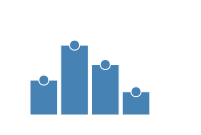
To create a bar chart, you define your data, initialize a Chart, and chain the .bar() and .encode() methods.
Note on Coordinates: The Chart component uses a “Chart Space” internally, where \((0,0)\) is at the bottom-left. Tesserax automatically handles the flip to SVG coordinates for you.
Code
from tesserax import Canvas, Chart, Colorsdata = [ {"category": "A", "value": 45}, {"category": "B", "value": 90}, {"category": "C", "value": 65}, {"category": "D", "value": 30},]with Canvas() as canvas:# Initialize a chart with dimensions chart = Chart(data, width=300, height=150)# Configure the mark and the encoding chart.bar(padding=0.2).encode( x="category", y="value", color="category" )canvas.fit(10).display()
Scatter Plots (Point Marks)
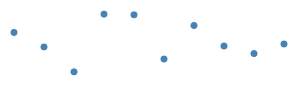
By switching to .point(), you can create scatter plots or dot plots. You can control the size of the points via the mark parameters.
Code
import random# Generate some random datapoints = [{"idx": i, "val": random.uniform(10, 100)} for i inrange(10)]with Canvas() as canvas: Chart(points, width=300, height=100).point(size=4).encode(x="idx", y="val")canvas.fit(10).display()
Composability
Because a Chart is just another Tesserax Component, it can be transformed, rotated, or placed inside layouts just like a Rect or a Circle.
Tesserax automatically selects the appropriate Scale based on the data:
LinearScale: Used for quantitative data (numbers) to map values to pixels.
BandScale: Used for categorical data (strings) to distribute items evenly with padding.
ColorScale: Automatically assigns distinct colors from a professional palette when the color channel is encoded.
Axes and Gridlines
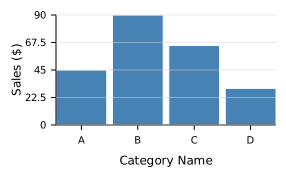
Tesserax charts can automatically generate axes, labels, and gridlines. You can configure these using a simple shorthand or a more powerful structured encoding.
Basic Axes
The .axis() method allows you to quickly add titles and toggle features like gridlines.
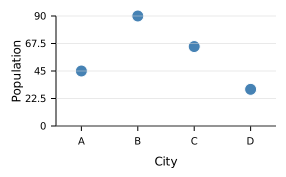
For more control, you can use the X and Y classes within the .encode() method. This is more consistent with the Altair/Vega-Lite philosophy and allows for fine-grained configuration of the Axis object.
Code
from tesserax.chart import X, Y, Axiswith Canvas() as canvas: Chart(data, width=300, height=180) \ .point(size=6) \ .encode( x=X("category", axis=Axis(title="City")), y=Y("value", axis=Axis(title="Population", grid=True)) )canvas.fit(10).display()
When axes are enabled, Tesserax automatically calculates margins to ensure labels and titles have enough space within the component’s bounding box.
Chart Animations (Enter-Update-Exit)
Tesserax supports reactive animations. When your data changes, the chart can automatically transition existing marks, animate new ones coming in, and gracefully remove old ones.
This follows the Enter-Update-Exit pattern:
Enter: New data points (identified by a unique id or index) are created and animated into view.
Update: Existing points move to their new positions and sizes.
Exit: Removed data points animate out before being detached from the scene.
To animate a chart, you use the chart.animate.data() method within a Scene.
Code
from tesserax.animation import Scene# Dataset 1: Initial statedata_v1 = [ {"city": "New York", "sales": 40, "cat": "East"}, {"city": "Chicago", "sales": 60, "cat": "Central"}, {"city": "Los Angeles", "sales": 50, "cat": "West"},]# Dataset 2: Chicago grows, LA moves to a new category,# NY is removed, and Houston enters.data_v2 = [ {"city": "Chicago", "sales": 90, "cat": "Central"}, {"city": "Los Angeles", "sales": 50, "cat": "West"}, # Category changed! {"city": "Houston", "sales": 45, "cat": "East"}, # New entry]with Canvas() as canvas:# We define the chart with 'city' as the natural ID chart = Chart(data_v1, width=400, height=200) \ .bar() \ .encode(x="city", y="sales", color="cat") \ .axis("x", title="City") \ .axis("y", title="Sales", grid=True)scene = Scene(canvas.fit(10))scene.play(chart.animate.data(data_v2).pad(0.2, 0.5), duration=2)scene.display()
How Identity Works
Tesserax needs to know which data point corresponds to which visual mark to animate them correctly. It determines identity in this order:
Checking for an explicit _id or id field in the row.
Checking the field encoded to the x channel (if it’s a string or integer).