Tesserax is a modern Python 3.12 library designed for programmatic SVG generation with a focus on ease of use, layout management, and flexible geometric primitives. It is particularly well-suited for visualizing data structures, algorithms, and technical diagrams.
Beyond static diagrams, Tesserax now includes a deterministic physics engine and a cinematic animation system, making it a complete toolkit for scientific communication.
Key Features
Rich Primitives: Includes standard shapes (Rect, Circle) plus advanced procedural geometry like Polyline with smoothing and subdivision support.
Declarative Layouts: Effortlessly arrange shapes in Row, Column, or Grid containers, or use algorithmic layouts like Tree and Force.
Smart Canvas: Automatically fit the canvas viewport to the content with adjustable padding.
Anchor System: Connect shapes using semantic anchors like top, bottom, left, right, and center.
Cinematic Animations: Create complex motion graphics using a declarative, code-first API that supports keyframes, morphing, and warping.
Physics Simulation: Bake high-precision rigid body simulations directly into your animations using the built-in World and Body primitives.
Statistical Visualization: Build data-driven graphics with an Altair-inspired API that decouples marks and encodings.
Installation
Tesserax has zero dependencies (literally). It’s 100% pure Python, and can be easily installed with pip:
pip install tesserax
Or if you’re one of the cool kids, using uv:
uv add tesserax
If you want support for saving PNG files, install with the export extra:
pip install tesserax[export]
Quick Start
To showcase how Tesserax works, we’ll build a small illustration step by step. We will start with a blank canvas and gradually add layers of complexity, from simple text to automated layouts and animations.
Step 1: The Canvas and Text
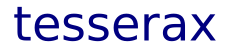
First, we initialize the Canvas and add the central Text element. The Canvas acts as our root container.
Code
from tesserax import Canvas, Textfrom tesserax.color import Colorswith Canvas() as canvas: t = Text("tesserax", size=48, font="sans-serif", fill=Colors.Navy, anchor="middle", )canvas.fit().display()
Step 2: Adding Geometric Shapes
Next, we add a Square and a Circle. At this stage, we create them without specific coordinates.
Code
from tesserax import Square, Circlefrom tesserax.color import Colorswith canvas: r = Square(30, fill=Colors.Green, stroke=Colors.Transparent).translated(-120, 0) c = Circle(20, fill=Colors.Red, stroke=Colors.Transparent).translated(120, 0)canvas.fit().display()
Step 3: Distribution with Groups
We can arrange these elements more easily with a Group. Groups can reorganize their inner shapes with align and distribute.
Code
from tesserax import Groupwith Canvas() as canvas:with Group() as g: r = Square(30, fill=Colors.Green, stroke=Colors.Transparent) t = Text("tesserax", size=48, font="sans-serif", fill=Colors.Navy, anchor="middle", ) c = Circle(20, fill=Colors.Red, stroke=Colors.Transparent) g.align("horizontal").distribute("horizontal")canvas.fit(10).display()
Step 3a: Using Layouts
An alternative is to use Layout subclasses like RowLayout, which automates this logic.
Code
from tesserax.layout import RowLayoutwith Canvas() as canvas:with RowLayout() as logo: r = Square(30, fill=Colors.Green, stroke=Colors.Transparent) t = Text("tesserax", size=48, font="sans-serif", fill=Colors.Navy, anchor="middle", ) c = Circle(20, fill=Colors.Red, stroke=Colors.Transparent)canvas.fit().display()
Step 4: Adding the Underline
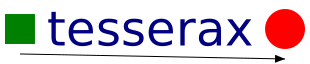
We use the semantic anchor system to draw a Polyline connecting the shapes.
Code
from tesserax import Polylinewith canvas: p = Polyline( points=[r.anchor("bottom").dy(10), c.anchor("bottom").dy(10)], smoothness=1.0, stroke=Colors.Black, marker_end="arrow" )canvas.fit(5).display()
Step 5: Making a Squiggly Line
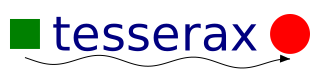
We can use subdivide and apply on the Polyline to creating a procedurally generated curve.
Tesserax scales from simple scripts to complex simulations. Here is an overview of the advanced capabilities available.
Geometric Primitives & Procedural Shapes
Tesserax provides a robust suite of atoms like Rect, Circle, Ellipse, and Arrow.
Polyline API: The Polyline class supports smoothing (Bezier interpolation), subdivision (increasing resolution), and simplification (reducing vertices).
Path API: For low-level control, use the Path class with standard SVG commands (move_to, cubic_to, arc).
The Layout Engine
Forget manual pixel pushing. Tesserax offers a hierarchy of layout engines:
Standard Layouts: Row, Column, and Grid automatically position elements based on gaps and alignment.
Hierarchical Layout: Automatically draws Trees and Directed Acyclic Graphs (DAGs).
Force-Directed Layout: Simulates physical forces to arrange arbitrary network graphs.
Cinematic Animation
The animation system is designed for storytelling, not just movement.
Declarative API: Compose animations using parallel (|) and sequential (+) operators.
Keyframes: Define complex multi-stage timelines for any property (position, rotation, color).
Morphing & Warping: Smoothly transform one shape into another or apply wave functions to geometry.
Physics Engine
Tesserax includes a baked physics engine for high-precision rigid body simulations.
Deterministic: Define a World, add Body objects, and apply Fields like Gravity or Drag.
Baked Playback: The simulation is calculated upfront and converted into standard keyframes, allowing high-resolution physics (e.g., 1000 steps/sec) to play back smoothly at any framerate.
Interoperable: Physics animations can be mixed and matched with standard tweens.
Statistical Visualization
Bridging the gap between diagrams and plots, Tesserax offers a grammar-of-graphics charting API.
Altair-lite API: Define a Chart, select a Mark (bar, point), and encode visual channels like x, y, and color.
Automated Scales: Includes built-in Linear, Band, and Color scales that automatically map data values to pixels and palettes.
Integrated Axes: Effortlessly add titles, ticks, and gridlines with smart coordinate management.
Why Tesserax?
In the Python ecosystem, there is a clear divide between data visualization (plotting numbers) and diagrammatic representation (drawing concepts).
Tesserax is for Scientific Drawing—providing the low-level primitives needed for total layout authority.
Libraries like Matplotlib map data to charts. Tesserax maps concepts to geometry. Use Tesserax for the schematics, geometric proofs, and algorithmic walkthroughs in your papers.
TikZ is the industry standard for academic figures but uses a cryptic macro language. Tesserax brings that same “total-control” philosophy to Python 3.12, giving you coordinate-invariant precision with the power of Python’s loops and types.
Contribution
Tesserax is free as in both free beer and free speech. License is MIT.
Contributions are always welcomed! Fork, clone, and submit a pull request.